
Choosing the Cost effective GPU for GROMACS Simulations: A Performance Study
Introduction:
Molecular dynamics (MD) simulations using GROMACS are computationally intensive and highly dependent on hardware performance. With the rapid evolution of GPU architectures, researchers today face an important question:
Which GPU delivers the best performance for its cost when running GROMACS simulations?
Objective:
1) Run GROMACS simulations on different GPU cards.
2) Evaluate performance across increasing system sizes
3) Compare professional GPUs vs Gaming GPUs
4) Identify cost-effective GPU choices for using different system sizes
System Sizes Evaluated:
To capture realistic and scalable simulation scenarios, we benchmarked complex–solvent systems across a range of increasing atom counts:
25K, 50K, 100K, 150K, 200K, 250K, 300K, 350K, and 450K atoms.
Note: The system size represents the total number of atoms, including the complex and surrounding solvent.
This range enabled us to analyze how GPU performance scales from smaller academic simulations to larger, production-level molecular dynamics workloads.
GPU Cards Tested:
To ensure a meaningful comparison, we evaluated both professional and gaming-grade GPU cards. Professional GPUs such as NVIDIA L4, A10, L40S, RTX A4000, and RTX A6000 are typically used in enterprise HPC setups and cloud platforms, offering stability and reliability for long-running simulation workloads.
In contrast, gaming GPUs including RTX 4080 Super, RTX 4090, RTX 5070, RTX 5070 Ti, RTX 5080, and RTX 5090 are more cost-effective and widely adopted in academic labs and startups, providing high computational performance at a lower price point.
This combination allowed us to directly compare performance, scalability, and cost efficiency across both GPU categories.
Methodology:
Protein–ligand molecular dynamics simulations were performed using GROMACS 2025.4, with over 100 simulation runs carried out at a 1 ns timescale. A consistent GROMACS simulation workflow was used across all experiments, and the same simulation protocol was applied to every system size to ensure a fair comparison.
Each system size was simulated on every GPU card under identical software and runtime conditions. Performance metrics such as simulation throughput (ns/day) and time to completion were recorded for each run.
The results were analyzed to understand how performance scales with increasing system size, how professional and Gaming GPUs differ in performance, and how overall cost relates to simulation efficiency.
Results and Discussion:
1. ns/day vs System Size – Gaming and Professional GPUs
Gaming GPU:
Gaming Grade GPU Cards vs System Size
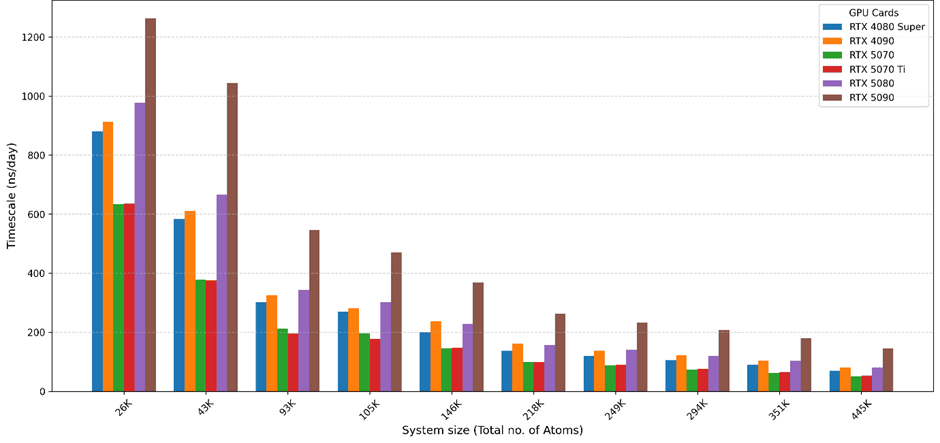
The ns/day versus system size analysis shows that gaming GPUs scale well as system size increases.
RTX 5090 delivered the highest ns/day across all system sizes, making it the fastest GPU tested.
RTX 5080, RTX 4080 Super, and RTX 4090 showed very similar performance, particularly for small and medium systems.
RTX 5070 and RTX 5070 Ti exhibited comparable performance, forming a lower performance tier among gaming GPUs.
Overall, performance differences among gaming GPUs are small for smaller systems but become more evident for larger biomolecular systems.
Professional GPU:
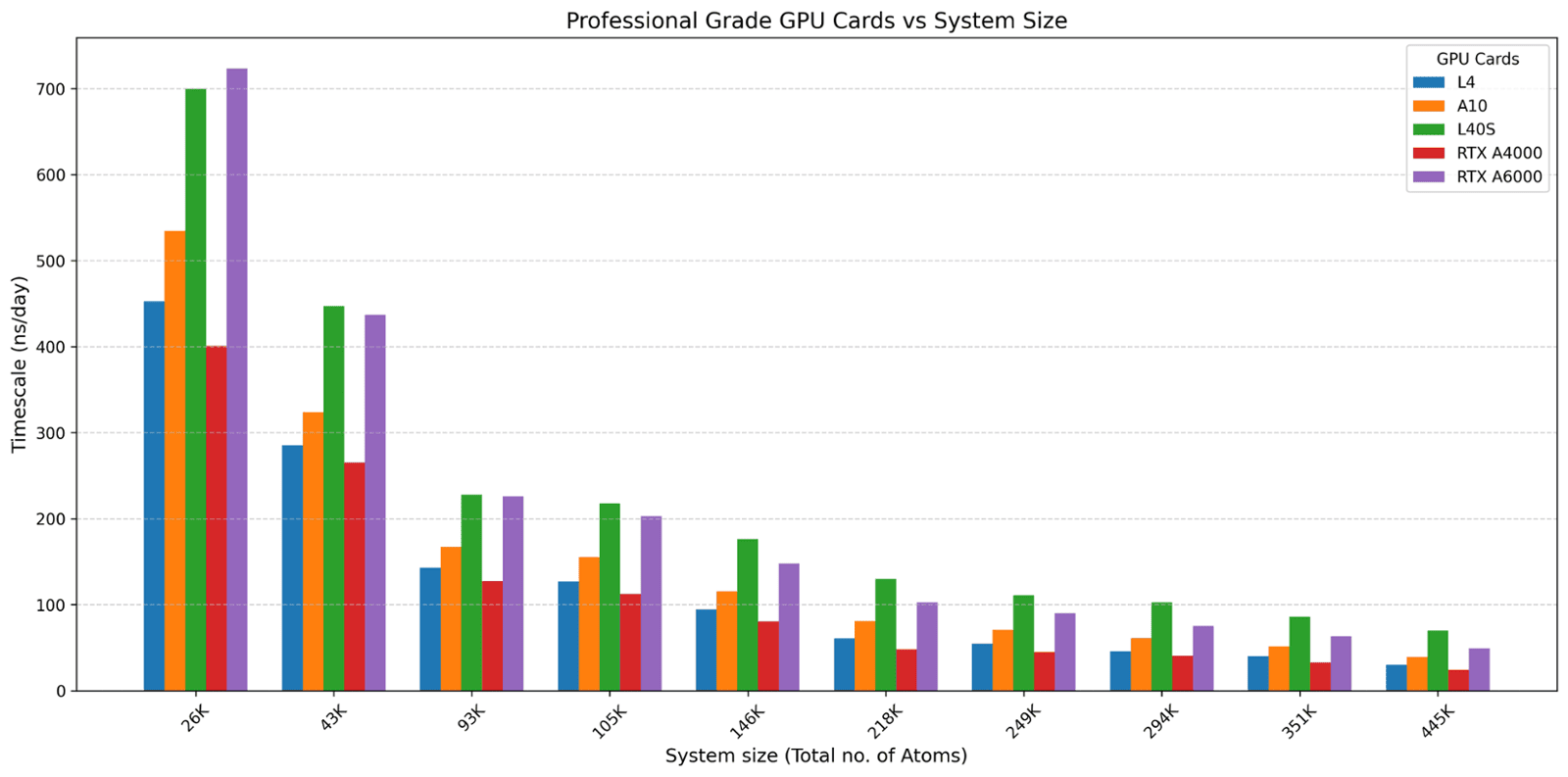
Professional GPUs exhibited different scaling behavior compared to consumer GPUs.
L40S was underutilized across most system sizes, despite its higher compute capability.
This underutilization is mainly due to CPU limitations, which prevent the GPU from being fully utilized.
RTX A6000 and L40S showed comparable performance for small systems, while
L40S outperformed RTX A6000 for large systems, benefiting from better scaling at higher workloads.
These results indicate that professional GPUs show clear advantages primarily for large-scale simulations.
The ns/day versus system size analysis shows that gaming GPUs scale well as system size increases.
RTX 5090 delivered the highest ns/day across all system sizes, making it the fastest GPU tested.
RTX 5080, RTX 4080 Super, and RTX 4090 showed very similar performance, particularly for small and medium systems.
RTX 5070 and RTX 5070 Ti exhibited comparable performance, forming a lower performance tier among gaming GPUs.
Overall, performance differences among gaming GPUs are small for smaller systems but become more evident for larger biomolecular systems.
Professional GPU:
Professional GPUs exhibited different scaling behavior compared to consumer GPUs.
L40S was underutilized across most system sizes, despite its higher compute capability.
This underutilization is mainly due to CPU limitations, which prevent the GPU from being fully utilized.
RTX A6000 and L40S showed comparable performance for small systems, while
L40S outperformed RTX A6000 for large systems, benefiting from better scaling at higher workloads.
These results indicate that professional GPUs show clear advantages primarily for large-scale simulations.
2. Time to Complete 100 ns Simulation
Gaming GPU:
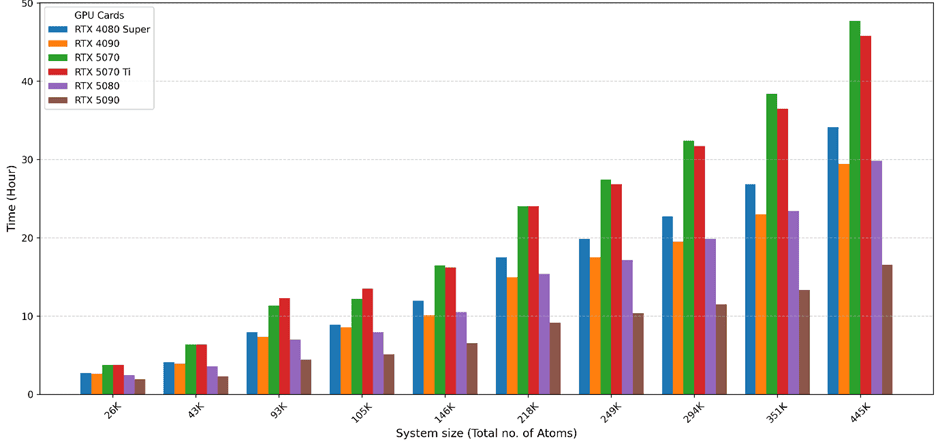
Time consumed by Gaming GPU Cards for 100ns vs system size
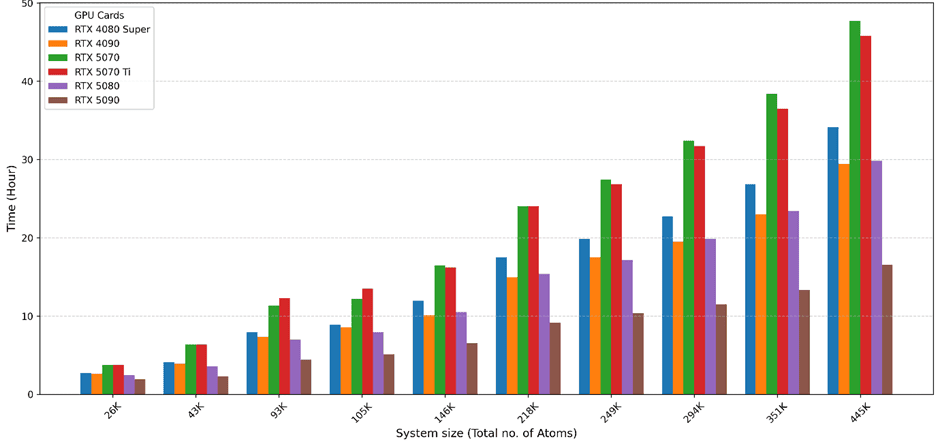
When simulation throughput is translated into time required to complete a 100 ns simulation:
RTX 5090 achieved the shortest completion time.
RTX 5080, RTX 4080 Super, and RTX 4090 required similar completion times, indicating near-identical efficiency.
RTX 5070 and RTX 5070 Ti took longer to complete 100 ns, particularly for larger systems.
These results show that mid-to-high-end gaming GPUs provide efficient turnaround times without requiring the most expensive hardware.
Professional GPU:
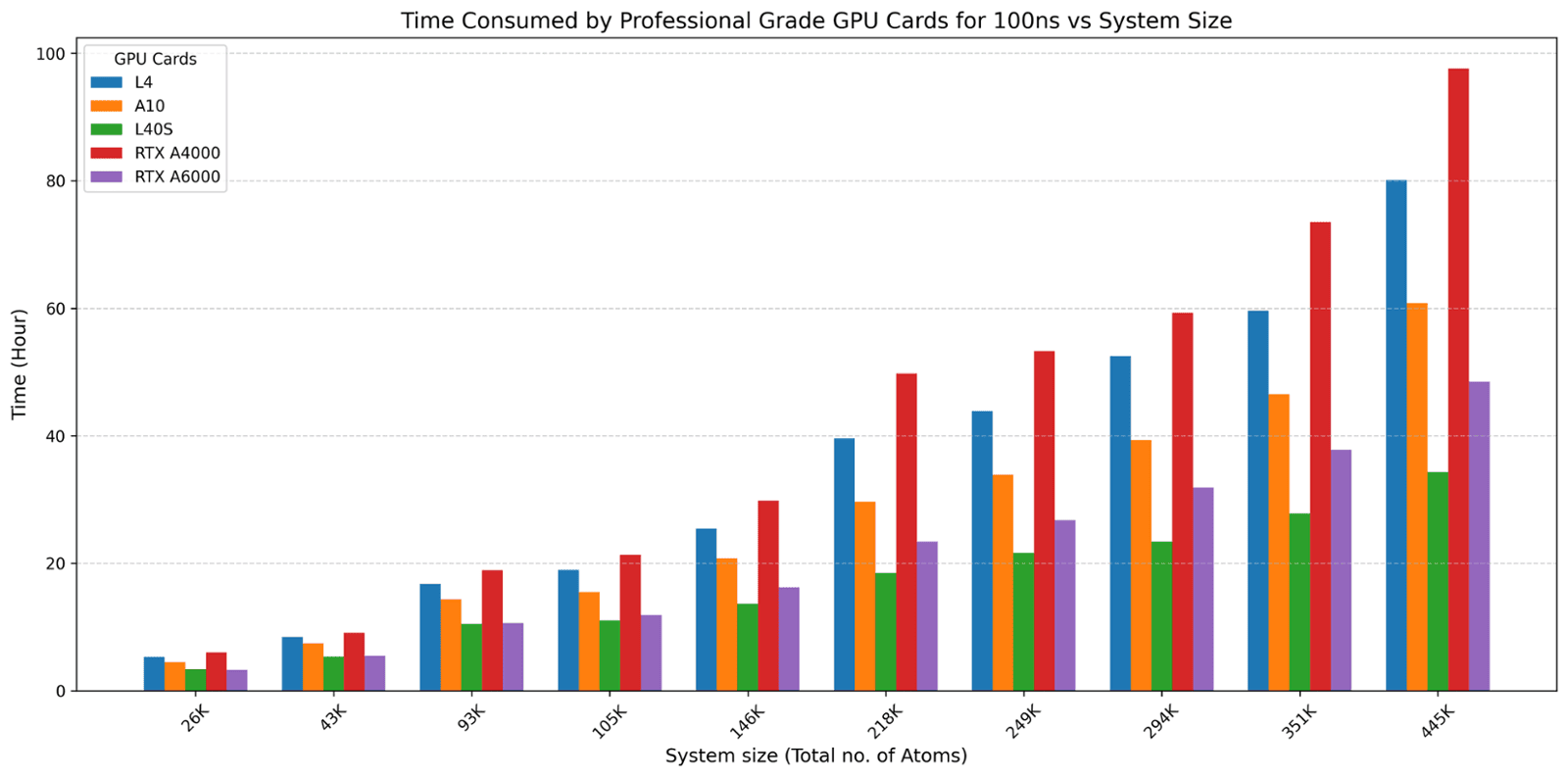
- For small systems, RTX A6000 and L40S completed 100 ns in comparable time.
For large systems, L40S completed 100 ns faster than RTX A6000.
However, the performance advantage of L40S is only fully realized when paired with a sufficiently powerful CPU
When simulation throughput is translated into time required to complete a 100 ns simulation:
RTX 5090 achieved the shortest completion time.
RTX 5080, RTX 4080 Super, and RTX 4090 required similar completion times, indicating near-identical efficiency.
RTX 5070 and RTX 5070 Ti took longer to complete 100 ns, particularly for larger systems.
These results show that mid-to-high-end gaming GPUs provide efficient turnaround times without requiring the most expensive hardware.
Professional GPU:
- For small systems, RTX A6000 and L40S completed 100 ns in comparable time.
For large systems, L40S completed 100 ns faster than RTX A6000.
However, the performance advantage of L40S is only fully realized when paired with a sufficiently powerful CPU
3. Cost–Performance Analysis
Gaming GPU:
Cost for 100ns using Gaming Grade GPU Cards vs System Size
- RTX 5090 offers the best raw performance, but at a significantly higher cost.
- RTX 5080 and RTX 4080 Super provide the best cost–performance balance among gaming GPUs for molecular dynamics simulations.
- RTX 5070 and RTX
- 5070 Ti are budget-friendly options, but less suitable for large systems
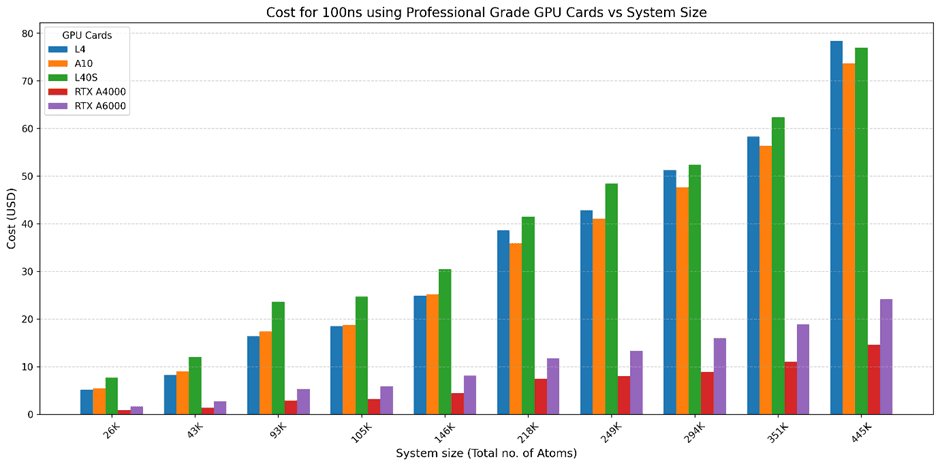
- Among professional GPUs, RTX A6000 and L40S offer the best cost–performance balance.
- L40S is cost-effective primarily for large systems, provided CPU bottlenecks are addressed.
Limitations of Workstation-Based GPU Setups:
- High Initial Investment
Setting up a GPU workstation requires substantial upfront costs for purchasing high-end GPUs, CPUs, and supporting hardware. - Electricity Costs
Continuous simulation runs, especially for large systems, lead to significant power consumption, increasing operational expenses over time. - Cooling Requirements
High-performance GPUs generate considerable heat, making efficient cooling systems essential, which adds to both infrastructure complexity and cost. - Security Management and Administration
Maintaining secure systems requires ongoing effort, including data protection, access control, software updates, and system monitoring, often needing dedicated IT support. - GPU Maintenance and Hardware Reliability
Over time, GPUs and system components require maintenance, cleaning, troubleshooting, and potential replacements, leading to additional costs and possible downtime. - Scalability Limitations
Expanding compute capacity is not immediate and requires additional hardware investment, making it difficult to scale based on workload demand. - Underutilization Risk
As observed in this study, even powerful GPUs (e.g., L40S) can be underutilized due to CPU bottlenecks or smaller workloads, leading to inefficient resource usage. Depending on the system size, we need to smartly utilize different GPUs. But it is practically complex to purchase that varied GPUs and retain for the organization.
Challenges in Cloud-Based GPU Workflows:
While cloud platforms offer flexibility and scalability for running GROMACS molecular dynamics simulations, they also come with certain practical challenges, especially when managed manually:
- Software Installation on Fresh Instances
Each new cloud instance often requires setting up simulation environments from scratch, including installing GROMACS, dependencies, and required libraries, which can be time-consuming and error-prone. - NVIDIA Driver and GPU Setup
Proper configuration of NVIDIA drivers, CUDA, and GPU compatibility is essential. Misconfiguration can lead to failed simulations or suboptimal performance. - Data Transfer Complexity
Transferring large simulation input files and trajectories between local systems and cloud instances can be slow and cumbersome, especially with limited bandwidth and requires command-line SFTP protocol. - Job Monitoring, Instance & Cost Management
Users must actively monitor running jobs, ensure simulations complete successfully, and terminate instances at the right time to avoid unnecessary costs. - Learning Curve and Setup Complexity
For new users, understanding cloud workflows, command-line operations, and resource management can be a barrier. - Reproducibility and Environment Consistency
Ensuring consistent environments across multiple runs can be difficult without proper configuration management.
Alternative Smart Solution: ScientiFlow
ScientiFlow abstracts away the complexity of working with cloud resources by smartly managing and scheduling jobs on the right GPU, allowing researchers to focus on science rather than managing infrastructure and technical hurdles.
Key Features and Advantages
1.Transparent Pricing: ScientiFlow ensures upfront pricing with no hidden charges. Users can easily estimate the cost per simulation sample before running any job, enabling accurate budgeting.
2.Pay-Per-Sample Model: Users pay only for the simulations they run, eliminating the need for subscriptions or upfront investments in expensive GPU hardware. Pricing starts at ₹750 per simulation, making high-performance computing accessible to labs of all sizes.
3.No Subscription & No Technical Knowledge Needed: The platform is designed for ease-of-use, requiring no subscription and no technical knowledge. Researchers can run simulations without worrying about managing hardware, software setups, or cloud environments.
4.Quick, Publication-Ready Results: Researchers can simply fill out a form, submit their simulation, and receive publication-ready images in just a few clicks. The platform handles all the underlying computation and visualization, saving time and effort.
1.Transparent Pricing: ScientiFlow ensures upfront pricing with no hidden charges. Users can easily estimate the cost per simulation sample before running any job, enabling accurate budgeting.
2.Pay-Per-Sample Model: Users pay only for the simulations they run, eliminating the need for subscriptions or upfront investments in expensive GPU hardware. Pricing starts at ₹750 per simulation, making high-performance computing accessible to labs of all sizes.
3.No Subscription & No Technical Knowledge Needed: The platform is designed for ease-of-use, requiring no subscription and no technical knowledge. Researchers can run simulations without worrying about managing hardware, software setups, or cloud environments.
4.Quick, Publication-Ready Results: Researchers can simply fill out a form, submit their simulation, and receive publication-ready images in just a few clicks. The platform handles all the underlying computation and visualization, saving time and effort.
- To get started, users can watch the demonstration video to see how simple it is to run simulations and generate results, all within your browser:
- To get started, users can watch the demonstration video to see how simple it is to run simulations and generate results, all within your browser:
Conclusion:
Choosing the right GPU for GROMACS molecular dynamics simulations is critical for balancing performance, cost, and efficiency. Our systematic benchmarking shows that while gaming GPUs provide excellent cost–performance for small to medium systems, professional GPUs excel at large-scale simulations—provided CPU and infrastructure limitations are addressed.
However, managing high-performance GPUs, whether on-premise or in the cloud, involves significant technical complexity, setup time, and operational costs, which can distract researchers from their core scientific work.
This is where ScientiFlow offers a smart alternative. By abstracting away hardware management, smartly scheduling jobs on the right GPU, and providing transparent, pay-per-sample pricing. ScientiFlow allows researchers to focus on science rather than infrastructure. With easy-to-use workflows and publication-ready results, high-performance molecular dynamics simulations are now accessible, cost-effective, and hassle-free for labs of all sizes.
Ultimately, the choice is clear: with ScientiFlow, researchers can save time, reduce complexity, and achieve high-quality simulation results without technical hurdles or hidden costs—making advanced computational studies more inclusive and productive than ever before.
Choosing the right GPU for GROMACS molecular dynamics simulations is critical for balancing performance, cost, and efficiency. Our systematic benchmarking shows that while gaming GPUs provide excellent cost–performance for small to medium systems, professional GPUs excel at large-scale simulations—provided CPU and infrastructure limitations are addressed.
However, managing high-performance GPUs, whether on-premise or in the cloud, involves significant technical complexity, setup time, and operational costs, which can distract researchers from their core scientific work.
This is where ScientiFlow offers a smart alternative. By abstracting away hardware management, smartly scheduling jobs on the right GPU, and providing transparent, pay-per-sample pricing. ScientiFlow allows researchers to focus on science rather than infrastructure. With easy-to-use workflows and publication-ready results, high-performance molecular dynamics simulations are now accessible, cost-effective, and hassle-free for labs of all sizes.
Ultimately, the choice is clear: with ScientiFlow, researchers can save time, reduce complexity, and achieve high-quality simulation results without technical hurdles or hidden costs—making advanced computational studies more inclusive and productive than ever before.